Alfred lasted 83 months. Its workflows did not.
Seven years on a macOS launcher that still runs fine, ended by the small programs other people built around it. What broke first, what replaced it, and why I would not buy the Powerpack again today.
83months
of daily use, then dropped
- Price
- £34 for a single license, roughly €40 or $46, as of September 2026
- Runs on
- macOS
- Replaces
- Spotlight
- Alternative
- Raycast, free, which is where I went
- Website
- alfredapp.com
 (opens in a new tab)
The problem
I bought the Alfred Powerpack for version 4 on 31 May 2019, two days after it shipped, and paid again for version 5 on 22 July 2022. My receipts are long gone, so those are dates rather than amounts. The version 4 license listed at £23 at the time, about €26. What the upgrade to version 5 cost me I cannot tell you, and neither can anyone else: Alfred does not publish upgrade prices. You type your license code into their shop and it quotes you a number, which means there is no public figure to look up, not in their blog, not in the forum, not in the trade press.
For those seven years Alfred was how I started nearly everything on this Mac. Rather than going to the Dock or digging through the Applications folder, I hit one key combination, typed two or three letters, and the thing I wanted was open. The same little window did arithmetic and unit conversions without my having to open a calculator, and it ran the small automations I had collected over the years. I never opened Spotlight in all that time, not because I had anything against it, but because there was nothing left for it to do.
What pushed me out was that the workflows stopped working, the ones for translation first and most noticeably. A handful of YouTube videos about Raycast arrived on top of that, and afterwards Alfred’s window looked like what it was, an interface designed in another decade. The videos were the occasion rather than the cause. If the workflows had kept running I would in all likelihood still be on Alfred, and still not minding how it looked.
What it does
A launcher is a text field that appears on top of whatever you are doing, and what it can do depends almost entirely on what you have taught it over the years. Mine did two things constantly and a long tail of things now and then.
Constantly: opening applications, and doing arithmetic and unit conversions typed straight into the same field. That second one sounds trivial until you sit down at a machine that does not have it and find yourself hunting for a calculator.
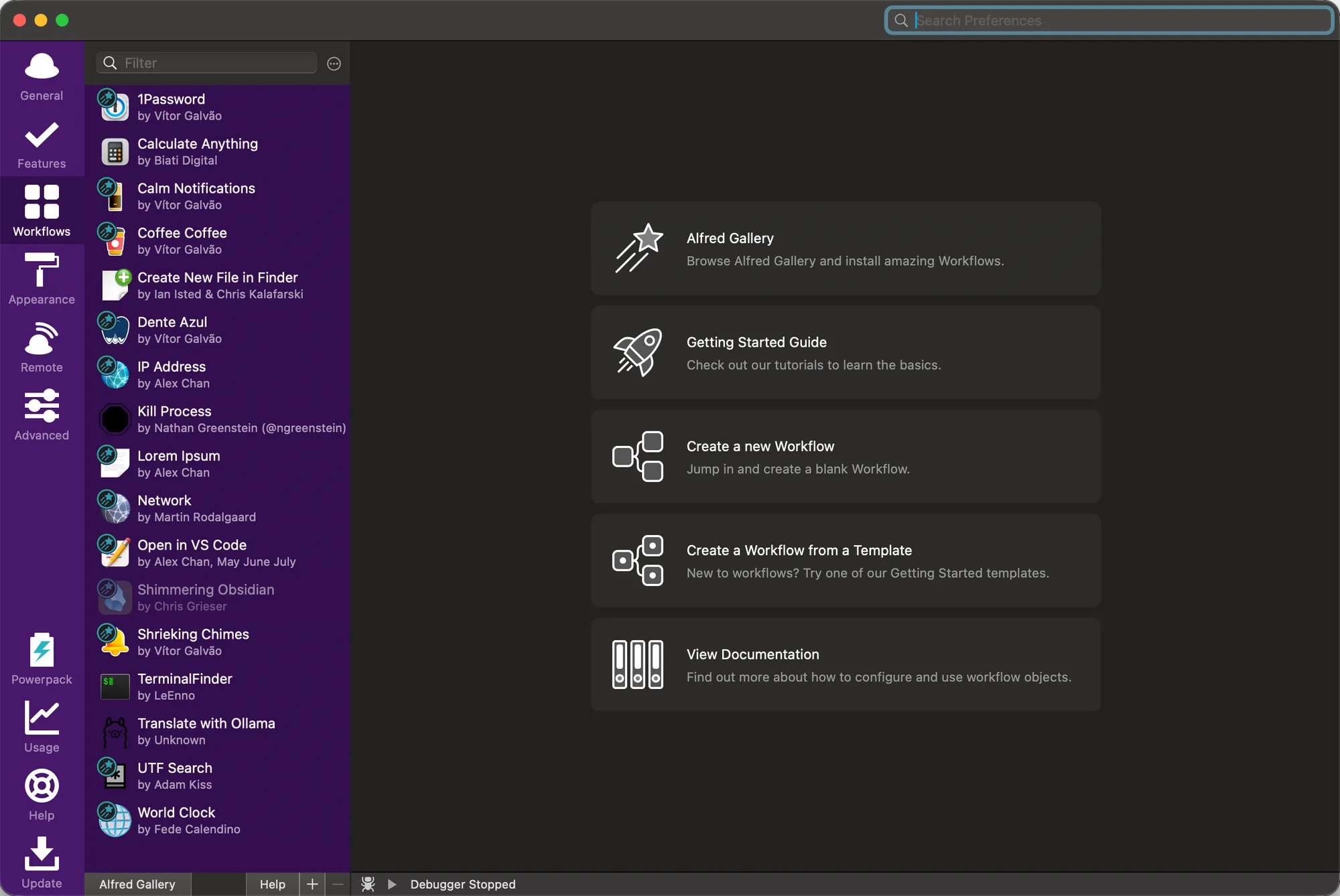
The long tail was the workflows, small programs that other people wrote and gave away, and this is where a launcher stops being a product and starts being yours. By the end I had seventeen installed, and not the same seventeen as in 2019: I added some, quietly stopped using others, and swapped a few out when something better appeared. What was there at the end:
- 1Password, vault items without switching to the app
- Calculate Anything, unit, currency and time conversions in plain words
- Calm Notifications, Do Not Disturb, optionally for a set number of hours
- Coffee Coffee, keeping the Mac awake
- Create New File in Finder, in the frontmost window, optionally from a template
- Dente Azul, connecting and disconnecting paired Bluetooth devices
- IP Address, local and external
- Kill Process, finding a stuck process by name and force-quitting it
- Lorem Ipsum, placeholder text
- Network, Wi-Fi, Ethernet, VPN and DNS settings
- Open in VS Code, the current folder or a searched file
- Shimmering Obsidian, my notes with their aliases, folders and headings
- Shrieking Chimes, timers and alarms
- TerminalFinder, from a Finder window to a terminal in the same folder, and back
- UTF Search, a character by its name, pasted
- World Clock, several zones at once
- and one I wrote myself, which I will come back to
Read as a list, that is seven years of small irritations, each one solved once and then never thought about again.
One thing it never did was a hyperkey, and since that turns out to be the single change I noticed most, it is worth explaining properly. A hyperkey is one physical key remapped to send Control, Option, Command and Shift together, all four at once. Because no sane application claims that combination, every shortcut you hang off it is guaranteed not to collide with anything. Mine is Caps Lock, a key in the best position on the whole keyboard that otherwise does nothing I want. Getting that with Alfred meant running a second utility permanently in the background. Raycast brings it along, and that utility is off my machine.
Where it fails
Alfred itself did not break. The ground under it did.
Translation is where I first noticed. It worked well through workflows at first, then failed more and more often, and eventually the ones built on DeepL and the rest stopped working altogether. I ended up writing my own with a local Ollama model, which translates, slowly, and which is the seventeenth workflow in that list.
The second thing was harder to pin down, and I want to be careful about how I say it: I stopped finding new workflows worth installing. Whether the gallery slowed down or I simply stopped looking is not something I can prove from the outside. What I can check is what became of the ones I had. Calculate Anything, the workflow I reached for most after 1Password, is still in the gallery, but marked deprecated, with no download button, pointing at a different workflow as its replacement. Three more that I use every week were never in the gallery at all and live in their authors’ GitHub repositories, which means their future is one person’s spare time and good health. Those are the terms for any small ecosystem, and a version number never shows them to you.
Alfred is still a little faster than what replaced it at finding apps and files. Not enough to have kept me, evidently, but the difference is there.
Who should skip it
Anyone whose needs stop at the basics, because Spotlight has caught up. macOS 26 added actions that run straight from the search field, among them sending a message, starting a timer, creating a calendar event and running Shortcuts, and third-party apps can add their own through App Intents. It added a clipboard history on Command+4, which keeps the last eight hours by default. It added Quick Keys, short abbreviations for actions.
One warning about that clipboard: it keeps everything you copy, passwords included, which dedicated clipboard managers make a point of not doing.
One thing makes this verdict less final than it sounds. Alfred 6 was announced on 10 September 2026, a week before I wrote this, as coming “this Autumn” in the company’s own words, and is in beta with a small group of users. The free upgrade covers anyone who bought in 2026 and holders of Mega and Legendary Supporter licenses; everyone else is promised a discount, again with no figure attached. No features have been described publicly, and nothing at all has been said about the gallery, which is the only part I would want fixed.
So: if you already own a Powerpack and your workflows still run, wait and see what ships. If you are starting from nothing today, I would point you at the other one.
And anyone not on a Mac, because Alfred has never been anywhere else. The nearest equivalents I know of are PowerToys Run and Flow Launcher on Windows, Ulauncher and Albert on Linux. I have not run any of them for a day, let alone a month, so this entry says nothing about how long they last.
If a tool outlived mine, or I got something wrong, write to the address in the legal notice.